What are the best PDF data extraction providers in the US?
For most US organizations, the choice comes down to three providers with distinct strengths: Datamation Imaging Services for high-volume document scanning across regulated industries, Data Extraction for localized flexible processing, and Public Data Archive LLC for government and archival workflows. PDFix rounds out the field with developer-oriented tools for native PDF structure parsing.
| Provider | Best For | Service Offerings | Automation and AI | Integration Options | Rating |
|---|---|---|---|---|---|
| Datamation Imaging Services | Financial, healthcare, manufacturing | Scanning, OCR, indexing, accessibility remediation, microfilm digitization | High-speed batch processing, OCR pipelines | Electronic storage, API-ready output | 4.9★ (13 reviews) |
| Data Extraction | Local NJ clients, flexible document processing | PDF indexing, data extraction, document processing | Flexible workflows | Custom formats | — |
| Public Data Archive LLC | Government and public sector archival | Data archiving, PDF extraction, public records processing | Government document workflows | Public sector formats | — |
| PDFix | Developers needing native PDF parsing | Structured PDF parsing, form extraction, tag editing | API-first, schema-based extraction | JSON, XML, REST API | — |
Key decision criteria: accuracy requirements, document type mix (scanned vs. native), automation depth, and whether you need a managed service or a self-hosted tool.

How do these providers differ in services, technology, and pricing?
Datamation Imaging Services covers the widest industry footprint of the three managed providers. Their core workflow runs paper records through high-speed scanners, applies OCR, indexes the output, and delivers electronically stored files ready for downstream systems. They serve financial institutions, healthcare networks, manufacturing plants, HR departments, insurance carriers, school districts, and government agencies. Accessibility remediation for PDFs and microfilm digitization set them apart from pure extraction vendors.
Data Extraction operates out of New Jersey and suits clients who need a local point of contact for document processing without committing to a large enterprise contract. Their service focus is flexible, covering PDF indexing and extraction for varied document types. Thin public profile means you should request a direct scope conversation before engaging.

Public Data Archive LLC, operating in the Washington, DC area, focuses on organizations that need extraction paired with long-term archival. Government agencies and public sector bodies processing large volumes of public records are the natural fit. Their experience with government document formats is the differentiator.
PDFix targets developers directly. It parses native PDF structure, extracts tagged content, and exposes a REST API for schema-based extraction. For teams building automated pipelines rather than outsourcing to a managed service, PDFix gives you programmatic control over output shape.
Pricing models across managed services are not publicly listed by any of these providers; you should request a quote based on volume and document complexity. API-based tools like PDFix typically charge by parsing and extraction credits per page, where schemas with more than five fields cost more per page than simpler schemas.
How does PDF data extraction actually work?
PDFs were designed for printing, not data exchange. The format stores text as positioned glyphs with no inherent semantic structure. A "Total" label and its corresponding value may sit in completely separate parts of the file's internal object model, even when they appear adjacent on screen. That gap between visual layout and machine-readable structure is the core challenge every extraction method has to solve.
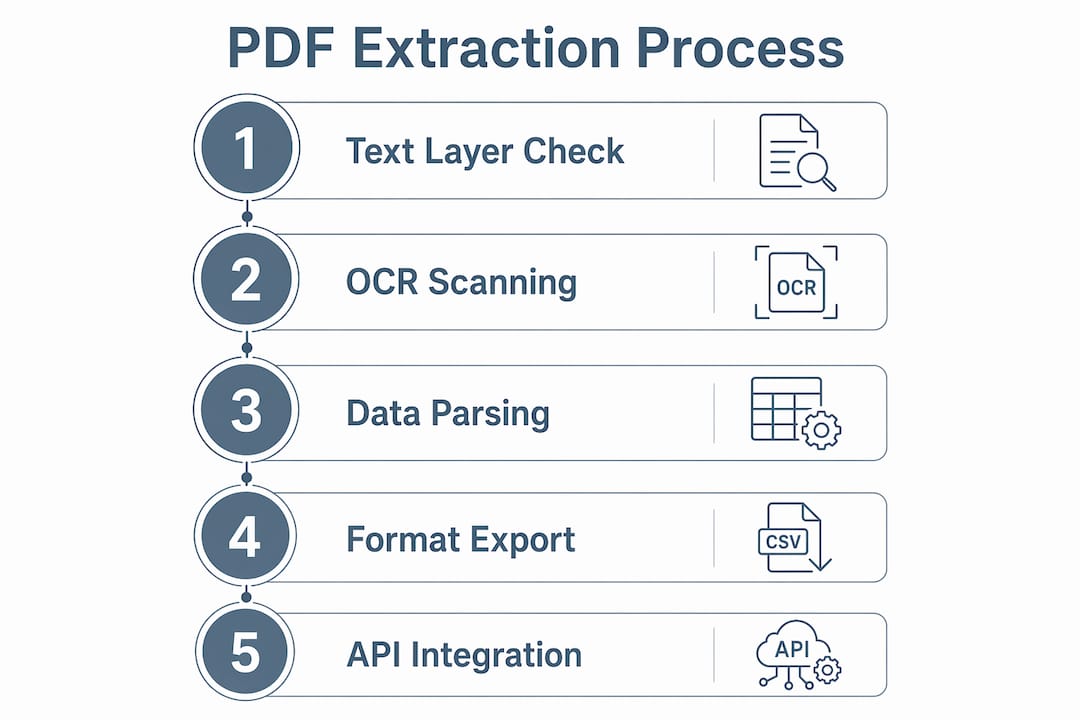
Three primary extraction approaches:
- Text parsing for native PDFs. Documents exported from Word, accounting software, or reporting platforms contain an embedded text layer. Libraries like pdfplumber or PyMuPDF read this layer directly, making extraction fast and reliable without any OCR step.
- OCR for scanned PDFs. Scanned documents are images inside a PDF container. OCR engines, including Tesseract via pytesseract or commercial platforms like ExtractOCR, reconstruct the text layer. ExtractOCR achieves over 99% OCR accuracy on invoices, tables, and scanned documents, supporting both bulk and real-time API workflows.
- AI and hybrid models for structure and context. Large language models read documents contextually, inferring logical reading order and data hierarchy that coordinate-based parsers miss. NVIDIA's NeMo Retriever OCR pipeline outperformed a vision-language model approach by 7.2% on retrieval recall across a diverse 10,000-document benchmark, while delivering 32.3x higher throughput on a single A100 GPU.
What you can extract:
- Plain text, paragraphs, and headings
- Tables reconstructed as row-and-column arrays
- Form fields, key-value pairs, and checkboxes
- Images with coordinates
- Multi-column layouts read in correct reading order
Export formats: JSON, CSV, XLSX, HTML, Markdown, and REST API webhooks cover the most common downstream targets.
What factors should you evaluate when choosing a PDF extraction service?
Picking the wrong tool or provider costs you in rework, not just money. Here are the factors that actually determine fit:
- Document variety and complexity. Do your files include scanned paper records, native digital exports, hybrid PDFs with both, or industry-specific formats like ANSI drawings or HL7 clinical documents? Providers like Datamation Imaging Services handle all of these; developer tools may require custom configuration per type.
- Accuracy requirements. Finance, healthcare, and compliance workflows have zero tolerance for extraction errors. For these, human-in-the-loop validation where AI flags low-confidence fields for manual review is not optional.
- Automation and AI sophistication. Do you need a one-time batch conversion or a live pipeline that processes incoming documents automatically? Managed services handle the former well; API-first tools like PDFix suit the latter.
- Integration and output formats. Your extraction output needs to land somewhere: an ERP, a database, a data warehouse, or a reporting tool. Confirm the provider supports your target format before signing.
- Cost and pricing model. Managed services quote by volume. API tools charge by page and schema complexity. For high-volume recurring workflows, caching parsed results eliminates redundant parse credits on repeat documents.
- Security and privacy. Documents containing PII, PHI, or financial data require providers with clear data handling policies, encryption in transit and at rest, and ideally on-premise or private-cloud deployment options.
- Scalability. Sequential processing works for small batches. Large-scale pipelines need parallel processing, queue-based architectures, and providers who can grow with your volume.
What do experts recommend for accuracy and efficiency in 2026?
The clearest trend in production extraction systems is the move away from single-method approaches. Hybrid extraction combining deterministic parsers with LLMs balances high accuracy and cost efficiency, particularly for complex manufacturing reports and mixed-format documents. Simple pages run through fast local parsers; complex tables and scanned content route to AI backends only when needed.
Human-in-the-loop workflows remain the standard for audit-ready quality. Advanced tools return a confidence score per extracted field. Fields below a set threshold get flagged for manual review rather than passed downstream automatically. This keeps error rates low without requiring humans to review every document.
Building template libraries for recurring document types is another practice that pays off at scale. Define the schema once for a supplier invoice or a quality report format, and every future document of that type returns an identical JSON shape. Maintenance becomes predictable.
docId for subsequent extractions on the same document costs only extraction credits, cutting total cost significantly on repeat workflows.How should you handle complex or scanned PDFs?
Scanned PDFs are the hardest case. Low-resolution images, skewed pages, handwritten annotations, and inconsistent lighting all degrade OCR output. Preprocessing steps, including grayscale conversion, contrast enhancement, deskewing, and noise reduction, improve recognition before the OCR engine runs. For clean scans at 200 DPI or above, accuracy approaches that of native digital PDFs.
Real-world documents vary significantly, and systems that ignore this variability risk missing critical data. The practical answer is a fallback architecture: classify each incoming document, route native PDFs to text parsers, route scanned files to OCR, and flag anything that falls below a confidence threshold for human review. Datamation Imaging Services applies this kind of tiered approach across their high-volume scanning workflows for healthcare and financial clients. Building template libraries for known document types, as noted in production extraction research, keeps fallback rates low over time.
Which industries rely most on PDF extraction?
Healthcare processes clinical notes, lab results, and insurance claims in PDF format daily. Extraction pipelines pull structured data into EHR systems, reducing manual entry and the errors that come with it.
Financial services extract transaction records, earnings reports, and loan documents. The volume is high and the accuracy bar is strict. Datamation Imaging Services specifically serves benefit funds and insurance carriers with these workflows.
Manufacturing generates quality reports, inspection records, and supplier documents in PDF form. Extracting defect data, part numbers, and measurement values from these files feeds process improvement systems and audit trails.
Government and public sector agencies manage large archives of public records, contracts, and regulatory filings. Public Data Archive LLC focuses on exactly this segment, combining extraction with long-term archival.
Legal teams process contracts, court filings, and discovery documents. Multi-page PDFs with complex layouts and mixed content types are the norm, making AI-assisted extraction with human review the standard approach.
Key Takeaways
Choosing the right PDF extraction approach depends on document type, accuracy requirements, and whether you need a managed service or a self-hosted pipeline.
| Point | Details |
|---|---|
| Provider fit matters | Datamation Imaging Services suits regulated industries; Public Data Archive LLC fits government archival; Data Extraction suits flexible local needs. |
| Hybrid extraction wins on accuracy | Combining deterministic parsers with LLMs handles complex documents better than either method alone. |
| OCR pipeline throughput advantage | NVIDIA's NeMo Retriever OCR pipeline delivered 32.3x higher throughput than a vision-language model on the same hardware. |
| Human review is a feature, not a fallback | Confidence scores and flagged low-confidence fields keep extraction audit-ready without reviewing every document manually. |
| FloorSignal for manufacturing PDF data | FloorSignal automatically parses quality reports and problem records from PDFs, structures the data, and delivers real-time dashboards without manual data entry. |
Your manufacturing reports deserve better than manual extraction
If you manage quality data in a manufacturing plant, the providers above solve the general extraction problem. FloorSignal solves a more specific one: your problem reports, defect logs, and inspection records are buried in PDFs and Word files, and pulling insight from them takes hours of manual work every week.
FloorSignal automatically parses your documents, structures the data, and surfaces defect trends, station hot-spots, and root cause patterns in a live dashboard. It adapts to your plant's existing report formats through an operator-driven field mapping system, so you are not rebuilding your documentation process to fit the tool. For mid-sized manufacturing operations that need structured data from their existing PDF and document workflows, it is a direct path from buried records to plant intelligence.
Recommended
From problem reports to plant intelligence.
FloorSignal turns the quality reports you already write into live dashboards. No new forms. No process change. Setup in days.
See your floor in 30 minutes